RunnerVision

See what the runners on your Mac are doing.

RunnerVision sits in the menu bar and watches your self-hosted GitHub Actions runners on Colima: which repo each one is building, the step it is on, when an image is being built or pushed, and how hard the VM is working. It's free.

Download for Mac
macOS 14 or later, Apple silicon and Intel
brew install --cask askraaai/tap/runnervision

The VM at a glanceColima's CPU, memory and disk, measured inside the VM.

Builds as they happenImage builds, pushes and pulls, with the tag and how long they've run.

Every busy runnerRepo, job, branch, commit and the step it's on. Click to open the run.

Idle runnersWaiting for work, ready to take the next job.
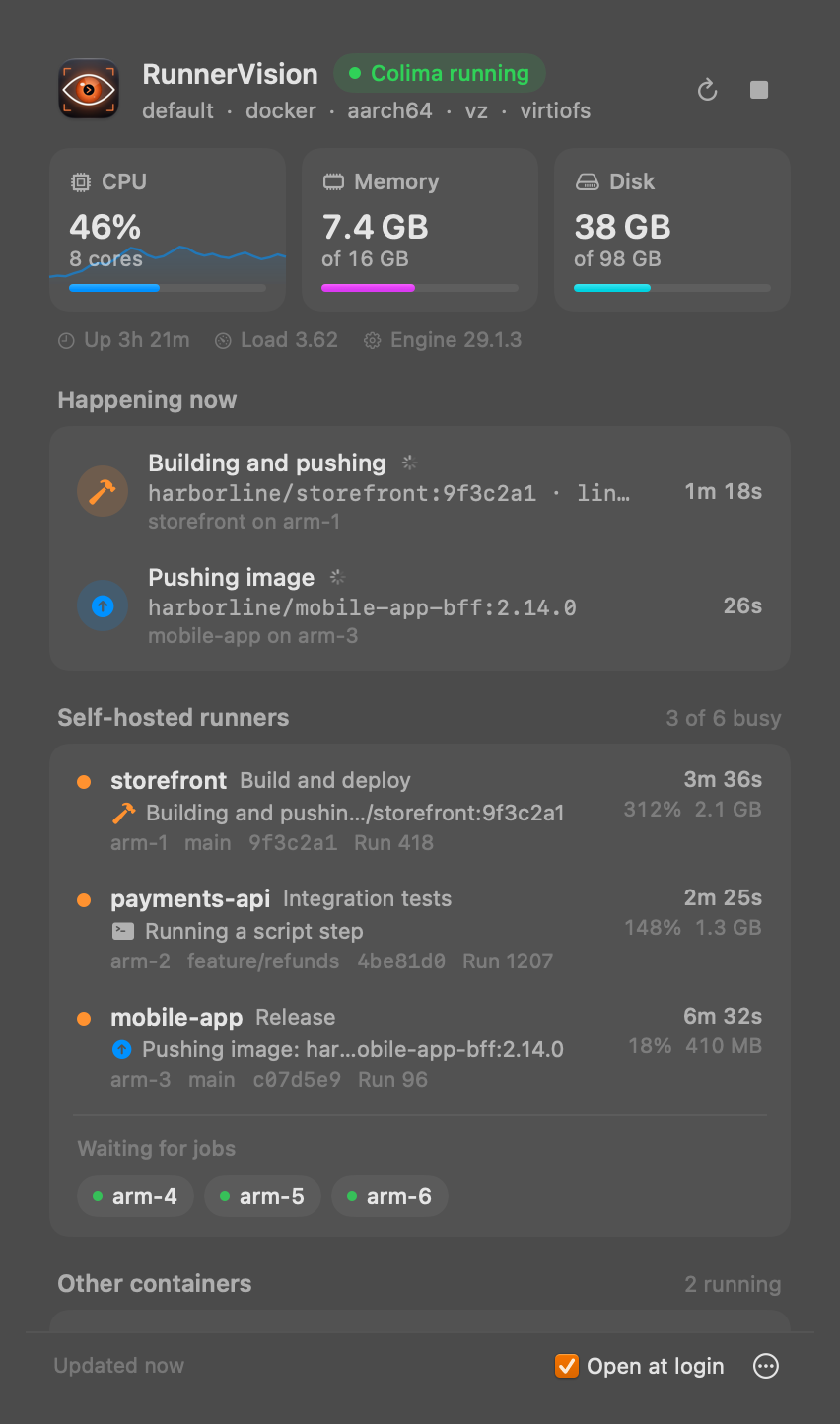
The RunnerVision popover showing Colima at 46% CPU, two image builds in progress, and three of six runners busy on storefront, payments-api and mobile-app jobs.
Sample data. The repos and runners shown are made up.

It reads what's already on your Mac

No GitHub token, no agent to install in your runners, no account. RunnerVision looks at Colima and your runners the same way you would from a terminal.

Built to stay out of the way

It's a small native app. It checks in lightly while closed and only looks closely while you're looking at it.

While closedChecks every 8 seconds, enough to keep the menu bar dot honest. Idle CPU stays near zero.
While openRefreshes every 2 seconds with live CPU and memory for each container.
Menu bar dotGreen when Colima is running, pulsing orange while a job or image build is running, no dot when Colima is stopped.
NetworkOne request a day to runnervision.askraa.ai/latest.json to check for updates. You can turn it off. Nothing about your runners leaves your Mac.
ShortcutsOpen a container's logs or a shell in Terminal, jump to a workflow run on GitHub, open at login.

Install

With Homebrew

Updates come with brew upgrade.

brew install --cask askraaai/tap/runnervision

Download the app

Open the disk image and drag RunnerVision to Applications. The app tells you when a new version is out.

Download for Mac

Needs macOS 14 Sonoma or later and Colima. New to Colima? brew install colima docker && colima start, then add runners with GitHub's self-hosted runner guide.

Questions

Does it need access to my GitHub account?
No. Everything comes from Colima and the runners on your Mac. Links to workflow runs open in your browser as usual.
Which runner setups work?
Runner containers in Colima (one job per container, or long-lived), runners with their own Docker engine inside the container, runners that share Colima's Docker socket, and runners installed directly on macOS. Several Colima profiles? Pick one from the menu.
Does it work with Docker Desktop or OrbStack?
RunnerVision is made for Colima. It reads Colima's VM and socket directly.
What does it cost?
Nothing. It's free to download and use.
How do I remove it?
Quit it from the menu, then drag it from Applications to the Trash, or run brew uninstall --cask runnervision.